| Pelican G3 Wireless Controller Review
The one thing I missed from Nintendo’s own wireless WaveBird was rumble pack support. With the G3 Wireless Controller, Pelican tries to correct this misfortune as well as add a few things of its own. While it can be hard to produce a third-party wireless controller (heck, it’s hard to produce simply a wired controller), Pelican pulled off the G3 Wireless surprisingly well. But is it any substitute for the WaveBird? Let’s break it down.
Product Features - Operating Range: 50 Feet
- Power Source: Two AA Batteries
- Battery Life (Rumble Off): 200 Hours ; Battery Life (Rumble On): 120 Hours ; Low Battery Indicator
- Multiple Channels: Eight
- WaveBird Compatible
- Three year Product Warranty
With a wireless controller review, you’re probably wondering about the most important feature first – the wireless functions. And with security I can say the Pelican G3 Wireless works just as well without a wire as WaveBird. I can still play in other rooms and through walls, and I can still play with no maneuvering the controller in order to get it in line with the receiver. The G3 Wireless actually fixes a few other gripes I had with the WaveBird’s wireless function – mainly the fact that with the WaveBird, the channel change was on the bottom, leading to random accidental changes in gameplay; but with the G3 Wireless, the channel change is on the main face of the controller. Sure, there are half as channels as the WaveBird, which could lead to some confusion, but I didn’t find it at all a personal problem.
Next, the controller itself, where I did find some problems. But to break it down, the G3 Wireless’s best asset compared to the WaveBird is a second “Z” button. No, it doesn’t perform “Z” button functions, but is actually used for turbo purposes. The actual button is smaller than the G3’s own “Z” button but is placed in the same position in reference to the “L” and “R” buttons. And like Naki’s controllers, the turbo button is hard to press and makes a large clicking noise, whereas the real “Z” button on the G3 Wireless isn’t. Why couldn’t they just make it a little bigger? Either way, I thought it was a pretty unique idea that should be further experimented with.
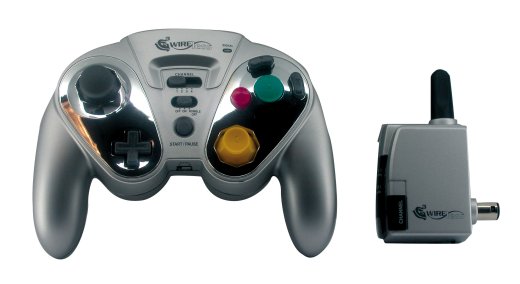
As for the other buttons and control sticks, they mainly performed as well as the WaveBird’s. However, the control stick has no grip on it, the D-Pad seems a bit stiff, and the “L” and “R” buttons seem a bit tougher to press down. And, for some reason, the controller itself just seemed very bulky and more clumsy to hold in comparison with the WaveBird, and unluckily it isn’t made out of the same materials out of the WaveBird, so it isn’t as comfortable to hold. It’s also much heavier than the WaveBird, but not too much as to hinder gameplay.
So what about the batteries? You can turn the controller to Off, On or Rumble Off on the main controller itself. Although Rumble Off supposedly lengthens battery life by 80 hours, I never used it and embraced the rumble pack features fully. And, well, I’m pretty surprised at the length of battery life. For testing purposes, I left the controller on an entire week while on vacation. When I got back, for about two weeks, I used the controller normally except, as usual as I did with the WaveBird, I always forgot to turn the controller off. Whether this affects the battery life or not I’m not sure, but my guess is that when it’s not in use, the battery life isn’t affected, either on or off, because my batteries still have not shown any signs of giving way. And that’s a good thing.
Overall, the G3 Wireless Controller performs best where it needs to perform well – mainly with its wireless functions. However, as a normal controller, it’s just average (mainly failing in the way it feels and with the stiffer buttons). However, if you really want rumble pack support, you may want to look into the G3 Wireless – just don’t expect it to be the second coming of the WaveBird.
|

 Main