| All-Star Baseball 2003 Review
Upon the launch of the Gamecube, All-Star Baseball 2002 was released. However, the Gamecube’s launch was in November (the baseball season had already ended) and the same game had already released on the Playstation 2 months ago; but nevertheless it was the Gamecube’s first baseball game. A few short months later All-Star Baseball 2003 was released, improving greatly over the 2002 version. Although the gameplay isn’t as good as I would have liked for it to have been, it’s still a decent game which baseball fans will eat up.
Game Features - All 30 Major League teams, including logos' and uniforms;
- More than 900 players;
- Official stadiums, with active dugouts and bullpens, real time scoreboards and jumbotrons, with stadium features;
- All-new player models, featuring 3-D Cyberscan technology, giving All-Star Baseball 2003 the most realistic representation for player faces ever seen in a video game;
- Future throw technology allows players to make incredible super-smooth catches and throws like never before;
- Innovative 3D batting interface and power/contact swing selection;
- User control over check swings;
- Never-before-seen broken bats;
- Season awards like the MVP, Cy Young, Rookie Of The Year, and Gold Glove;
- Incredible gameplay depth with 10 game modes, including Exhibition, Season, Career, Franchise, Expansion, All-Star Game', Series, Manager, Home Run Derby' and Batting Practice;
- Franchise Mode allows users to play and build their favorite team for up to twenty consecutive seasons;
- All-new Expansion Play allows baseball fanatics to choose a city, stadium and team logo, and add that team into the Major leagues for season play;
- All-new Expansion draft, whereby users will draft from a pool of unprotected players and build a team of free agents and minor leaguers;
- First time ever -- official in-game player trading cards, which enable users to collect, trade and unlock cheat codes throughout the game;
- More than 50 stadiums to choose from, including 8 classic and 10 expansion stadiums;
- Cooperstown Hall Of Fame team, featuring favorite sluggers from the past, such as Mike Schmidt, Reggie Jackson and Yogi Berra;
- Seven authentic stadium camera angles for television broadcast views;
- First time ever -- a 3-man broadcast booth with Bob Brenly (Manager of the Arizona Diamondbacks, the 2001 World Series Champions), Thom Brennaman and Steve Lyons.
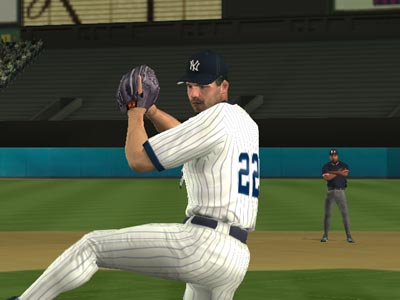
All-Star Baseball 2003 is packed in with a plethora of features as you can see, from season mode to franchise mode to expansion mode. But unluckily, most of these features won’t be playable with your Memory Card 59 as they take up more space than the entire card. Although at this time of writing a bigger official memory card has released, it was an awkward move to have huge save files like this when the only memory cards capable of holding the data were third-party memory cards.
But if you have one of those, you’ll be able to dive right into the game. Admittedly the game’s opening menu is a bit boring, and the music is not worth hearing, but it’s easy to get started. Most gamers will start off with the usual quick game or exhibition game, choosing their team and opponent, before they go into deeper modes. This is a wise choice as All-Star Baseball 2003’s gameplay is very difficult, and you may want to play several practice games before considering going any deeper.
Batting is extremely tricky in this game. As balls are thrown to you, you move around a triangular cursor around a batter’s box and, right before the ball crosses the plate, press “A” where you think the ball will end up being. Balls are thrown to you at very high speeds so it can sometimes be tough to master the art of batting. There is more depth to batting than even this, however. By using the “C-stick” you can maneuver the cursor’s angle on the screen in 3D fashion, allowing you to hit farther or in a needed direction. This simply complicated things for me and I never really mastered this part of batting, but if you’re good you may want to try this trick out. The main problem with batting is that you’ll barely have any time to move your cursor before the ball goes over the plate, and you’re simply given too much to do in a small amount of time. The easy batting option eliminates the cursor altogether, but you won’t get any level of satisfaction from using it. If you want to practice your batting more, Acclaim put in a batting practice mode and the Home Run Derby as well, so you may want to hit a few balls there.
While pitching is really in no way complicated, it in many ways is more tedious than batting, simply because it’s incredibly boring to just go through a few menus each time you want to hit. In your first few games the boredom is mainly because you strike out fast with your batter and take forever to pitch, but pitching can be easily mastered and over with quickly once your over with it.
Next up is the fielding. Think I’m done complaining? Think again. Due to the fact that the camera can be a bit slow in telling you where the ball is going, if it’s hit to the outfield you’ll have to do some very fast thinking if you want to catch the ball before it hits the ground. Fielding infield is a bit easier than this as you can view everything with ease, but the main problem is a problem both the outfield and infield share – throwing the ball. Awkwardly the game uses the “A” button to throw to home, the “X” button to throw to first, the “Y” button to throw to second, and the “B” button to throw to third base. You’d never think this was tough until you’re actually doing it, and I constantly had to scramble to find the appropriate button.
But even with the extremely difficult learning curve, is the game really that bad? Luckily, many gamers will eventually become good at the game and find themselves winning a few games, and this is the point at where the game becomes fun. Simply put, there are so many modes to mess around in and so many extras that Acclaim chose to give. One of these extras is the playing cards feature. Upon doing some things in the game such as hitting a home run, pulling off a diving catch or even simply retiring a side, you’ll get points. For every ten play points you get, you are able to open a card pack. There are really hundreds of cards to collect, and some cards will unlock fun extras. This is one interesting mode, and seeing as a lot of baseball fans are into baseball cards, this was a good idea on Acclaim’s part.
If you’re going for a full season or even the very in-depth franchise mode, All-Star Baseball 2003 is very true to the sport. Although the most rewarding thing about completing the season is probably completing it in itself, end-of-season awards such as Most Valuable Player, Cy Young, Rookie of the Year and Golden Glove are given out. With the franchise mode, you’re given a whole lot to do, but not in an overwhelming sense – this game is packed with options so that you can make your baseball franchise the best. You will handle all decisions from bringing over minor league players to trading players. Nice.
One feature that seemed to be left out of the final game was the Gamecube-Game Boy Advance link-up, which was in the instruction booklet with all the instructions, menu screenshots and more. Even the Acclaim website lists it as a feature. Upon contacting Acclaim it seems they just couldn’t get this feature into the game on time, so who knows if it will show up again.
But surprisingly it does not stop there. If you get over the huge learning curve hurdle, you’ll be a very happy camper, even if you paid full price for this game. Even outside of the baseball season I’m often pulled into the game, and that is most certainly a good thing.

Graphically I didn’t find All-Star Baseball 2003 incredible, but it was certainly an improvement over the 2002 version of the game. Players going up to bat are more realistic this year (before they were just very stiff players walking up) and very realistic crowds cheer on everything you do well. This is partially thanks to the 3-D Cyberscan technology Acclaim used to model every baseball player like they are in real life. The main problem with the graphics comes when you’re playing and doing things like batting or pitching. When batting you can barely make out the pitcher’s face and everything on the field seems to be this one huge blur. The animations when running and fielding are very much a bore, and I can’t wait until baseball games step over this very huge hurdle into realism. There’s definitely no question you’re playing a baseball game.
But the sound is one thing you have to appreciate. Even if you’re intimidated by the overly complicated gameplay and sometimes boring graphics, this is one thing that is done nearly perfectly. You really can’t tell whether you’re listening to a real baseball game or a baseball video game. This is because Acclaim got a hold of the same guys you’ll hear in a lot of baseball games on television (Bob Brenly (Manager of the Arizona Diamondbacks, the 2001 World Series Champions), Thom Brennaman and Steve Lyons). Perfect voice acting is one thing the series has needed, and the only thing that brings the score of the sound down is the menu music and other things like that (which are okay, but nothing to get excited over). Kudos to Acclaim for this awesome sound booth team.
Read This
Overall, when you’re done with this game (although it never really ends), you don’t know what to think of All-Star Baseball 2003. It’s very much a packed in game, with nice vocal feats and a ton of features, but just like you could expect that doesn’t always help the lacking gameplay. Many gamers will never overcome the learning difficulty hurdle (it took me many long weeks to even begin winning a game), but this seems to be the path the game has now taken, so take it or leave it. It simply isn’t fitting to my tastes ultimately, and I’d rather play a fast-paced game of baseball in MLB Slugfest 20-03. But if it’s a simulation you’re going after, you may just find a gem in All-Star Baseball 2003.
- Jonathan Coley
|
Information | |
Game: All-Star Baseball 2003 |
Publisher: Acclaim | |
Developer: Acclaim Studios Austin. |
Genre: Sports | |
Release Date: February 26th, 2002 |
Players: One To Four |
|
Final Scores (Ratings Guide) | |
Graphics:
Graphically the game isn't incredible, and there's no question you're playing a baseball game and not watching a real game, especially with the poor animations. There are realistic crowds and the cyberscan technology used on batters was a nice touch. | 7.0 |
Sound:
The commentary in this game is probably the best of any baseball game on the market, done by Bob Brenly (Manager of the Arizona Diamondbacks, the 2001 World Series Champions), Thom Brennaman and Steve Lyons. It's very realistic and nothing repetitive. | 9.5 |
Gameplay:
Incredibly tough batting procedure (you have to be very, very quick) and it's very boring pitching. The controls when fielding are also confusing. It is, overall, a decent simulation though. | 5.5 |
Replay Value:
There are definitely many, many features in this game and if you like what you see you'll come back. But the batting and pitching difficulty curve is a bit too high for most players and for that reason, many won't play further. | 6.5 |
|
Overall Score: | 7.0 |
Rent This Game For FREE at GameFly.com |

 Main