| Nintendo WaveBird Wireless Controller Review
 For year’s mankind has had to deal with annoying cords -- cords that caused countless accidents, resulting in a system on the ground and damaged, and cords that forced players to sit in certain places when gaming. As you can see, cords are to blame for many negative things. Yet, somehow, all gamers all over have put up with them, and have waited patiently until that day when we could all play wireless, yet still experience our games flawlessly. Well, that day has finally arrived. Nintendo has released their finest innovation in years: a wireless GameCube controller than actually works. It doesn’t just ‘work’, in fact. It works perfectly, and is an equal measure of the original, standard corded GameCube controller. Once you’ve played with this puppy, chances are you will never want to go back to those annoying, easily tangled cords that those PS2 and Xbox gamers must endure.
The Good - Wireless gaming
- A cordless controller that is just as good as the original, if not better
- Works up to 60 feet
- Only runs on two AA batteries, giving over 50 hours of battery life to the controller
- Complete freedom from cords
The Bad - Battery life – can you put up with changing batteries?
- Loss of rumble
- Hard to read channel digits on controller and reciever
Several companies over the last few generations have tried to accomplish what Nintendo has with their Wireless Wavebird controller for the Nintendo GameCube. Companies that attempted to create an acceptable wireless controller for gaming have all produced unacceptable controllers that actually make players want to play with a cord. Several of the past wireless controllers limited players to gaming within a certain boundary when playing their console and its games. The boundaries weren’t very relaxed, though, making the experience in the end a terrible one. What’s worse is that these wireless contraptions forced players to point the wireless controller directly at the Wireless receiver plugged into their system. The end result, again, is a more limited experience than what players had to live with to begin with.
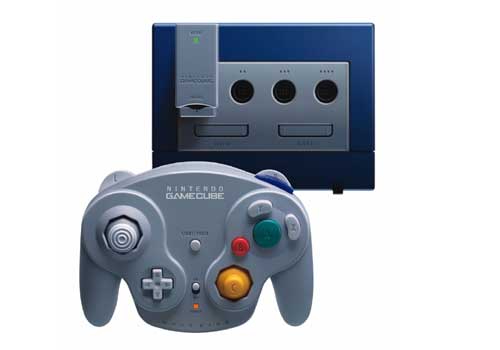
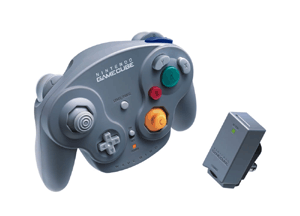
Now, several years later, after countless technological revolutions and evolutions Nintendo has put out a controller than gives even the original a run for its money. The Wavebird, Nintendo’s premier wireless controller, allows players to engage in their gaming sessions wirelessly, with little limitations to speak of. Unlike other cordless controllers in the past, players are not forced to line up a signal with the receiver for the wireless controller, nor are they forced to play in an unreasonable boundary. The Wavebird uses a signal that can be read through even the thickest of the thickest walls on the face of the earth. They also operate perfectly up to a 60 ft. distance between controller and receiver, even though Nintendo suggests playing at 25 feet. The controller works twice as good as Nintendo claims, making it a top contender, if not the replacement for the original GameCube controller. The end result is players relaxed in their sofa, gaming cordless.
Now, of course there are always sacrifices when attempting to do what Nintendo has accomplished. However, players will be surprised to know that there are only two minor sacrifices made to use the Wavebird. The first sacrifice is the requirement of batteries. Since the controller doesn’t plug into anything it must run off two AA Batteries. The best way to cope with this problem is to buy a set of rechargeable batteries, as well as a battery charger. This way you won’t end up in the poor house thanks to a possible-rise in spending on batteries. The second and last sacrifice to make the Wavebird do what it does is the loss of the built-in rumble from the original GameCube controller. Since battery life is already an issue, Nintendo claims they left out the rumble to increase battery life with the controller. The batteries is said to last 50 hours, and with the hundreds of hours logged I’ve only had to change batteries a few times.
In the end, the Wavebird, itself, is the exact same as the corded controller, only it is wireless. If playing wireless is an important part of gaming then buy the Wavebird. It works perfectly. We’ve compared the controller to the original in every possible way, to how comfortable it is to hold, to button-reaction time (if there is a delay when hitting a button, which there is none with the Wavebird), to how much heavier it is than the original, which is slightly (but just barely noticeable) heavier than the corded controller. If you’re willing to sacrifice rumble for complete freedom then the Wavebird is a safe investment. Chances are once you play with it you won’t be able to go back to cords. The fact is gaming wireless is as good as gaming corded, if not better. Like we said, if you’re willing to give to get, then the Wavebird will be the best accessory you buy for the GameCube probably its whole life. Buy it.
Read This
The fact of the matter is gaming wireless is better than with cords. I don’t really care for the rumble feature, and replacing batteries is easy for me to do, so really I don’t lose anything much from not playing with the corded controller. In the end, I can’t even bare to play my other systems, such as PS2 and Xbox, as the cord makes me feel too tied down to the game. With the Wavebird I am free, and comfortable to do what I please.
However, there are a few other shortcomings with the controller; two to be exact. Both don’t really affect how the controller works, though, so maybe they will be a bigger burden on some more than others, but the fact is the shortcomings could have been fixed or improved upon. First off, there is no way to tell when the batteries in the controller are close to dying. Therefore, you may end up with a dead bird right in the middle of that precious boss-fight you're on. Another problem is the chanel digits on the receiver and controller are almost impossible to see without a nicely concentrated light above the controller. Why couldn’t Nintendo have made them easier to read?
But even with those shortcomings, the Wavebird is Nintendo’s greatest innovation in years, easily. Buy it now.
--Phillip Levin
The Wavebird is definitely a great achievement and a great controller. I've never seen a wireless device as good as this one. However, it hasn't always been so good for me due to a number of factors. One, the batteries. I always, always forget to turn the Wavebird off, as never in my years of gaming have I been used to turning a controller "off." For this reason and the fact that sometimes I leave my Gamecube running for a few hours, the batteries drain; and if they run out, randomly when playing, you'll wonder what's happening because your car in a racing game randomly stops near the finish line. I also wasn't wild about the channel changer being at the bottom of the controller since for some reason I accidentally change channels in the middle of the game (so that the Gamecube isn't executing anything you're doing) and I mess up. The controller also has no rumble pack, which can be pretty annoying at times. That said, there are a number of great things about this controller which by far overshadow the annoyances and make this my controller of choice. One, it's wireless, and I love being able to play from any stance or position. Also, the batteries last quite a while, making the fact that batteries can run out during the game not so bad. Finally it was constructed very nicely and it feels no different than your normal controller, except without the wires -- a huge plus in my mind. If you're looking for an extra Gamecube controller, look no further -- but it isn't perfect.
-- Jonathan Coley
|

 Main